Category Archives: Tips and Techniques

Tips, tricks, and how-tos on working with Tableau

Tableau Data Blending, Sparse Data, Multiple Levels of Granularity, and Improvements in Version 8

Tableau’s data blending feature is great for mashing up data sets from a whole variety of data sources. Want do download local weather data from Weather Underground to see how precipitation affects your coffee sales in Seattle? Sure!

However, blending can be a little tricky to set up to get the appropriate level of detail in the view, especially when you need to blend at one level of granularity and aggregate at another. In this post, I’ll walk you through a technique for doing this in v7, and how version 8 makes this process easier, using an example drawn from my own work that adds a level of complexity because the data is sparse. This makes a great case study for how to integrate different features of Tableau to create the desired view.

Continue reading

A Virtual Orrery in Tableau

My daughter loves gymnastics, watching animal dissection videos, kale chips, and space. I’ve always been fascinated by orrerys, and not having the mechanical skill to build one, I decided to make a virtual one for her, and of course thought of using my favorite visualization tool:

Continue reading

Learning something new every day: Annotating Subtotals

I’ve been reading Alberto Cairo‘s The Functional Art – which is a fabulous book, btw – and thinking about annotations as part of storytelling. Then Tableau Zen Master Joe Mako posted this yesterday:

Eddie Van Halen and Dashed Lines

Mastery can be magic. I can remember a time as a young person when I just started to have a clue about how music was made hearing an Eddie Van Halen solo on the radio and wondering, “How does one person make that many notes???” Or the scene in The Empire Strikes Back where Yoda lifts the X-Wing out of the bog and Luke is hornswoggled. Amazement, disbelief, and “I want to do that too!” all rolled into one feeling, when the heretofore impossible becomes, for an instant, possible.

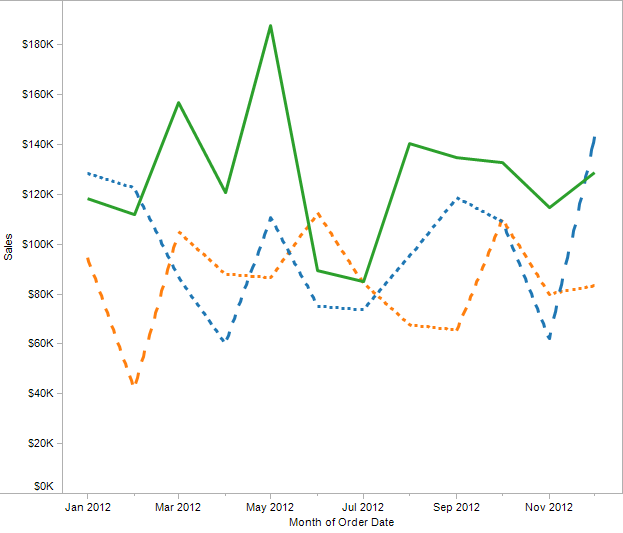
One of the things Tableau doesn’t do is let you draw line charts with dashed lines, to create a view like this that could be from Excel or another application:

Solid and Dashed

Except that Tableau can do this, and you’re about to learn how – actually, three entirely different techniques. Along the way you’ll learn some more about how Tableau draws Line Marks and table calculation domain padding.

Continue reading

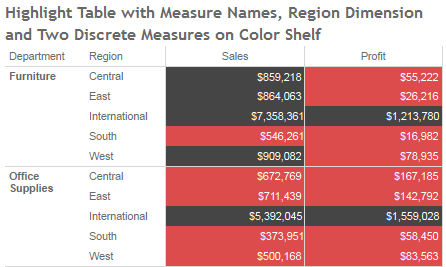
Measure Names on the Color Shelf: Tableau v8 Enhancements

Tableau version 8 “The Kraken” is in beta right now, and Tableau is also beta testing Tableau Public for the new release, and they’ve kindly given me access to it. Tableau v8 is a huge release, as I’m exploring it I’m finding some subtle and not-so-subtle differences. In the coming weeks I expect to do a series of posts on how those changes affect my workflow, and/or relate to prior posts of mine.

I’m going to focus on the new feature that enables multiple discrete (blue) pills on the Colors Shelf of the Marks Card, in particular how it interacts with the Measure Names pill and makes possible some things that were much more difficult to to in prior versions of Tableau.

Continue reading