Tag Archives: lod calculation

Keeping a Value in Totals Whilst Excluding from Quick Filter List

Over at Peter Gilk’s Paint by Numbers blog there was a question on this post on filtering while retaining results. Here’s the what Jeremy asked:

May I ask if it would be possible to get a detailed explanation of applying this principle to a different type of data?

For example, I would like to see the US Sales totals, and have the ability to filter it to a US state without the ability to select a US territory (Guam, Puerto Rico, etc), but to have the US territory sales remain in the US national totals. How could I do this?

In this short post I cover two different techniques how to do this using a self-data blend and LOD expressions, respectively.

Continue reading →

LOD Expressions and Custom Grand Totals: Replacing Table Calculations and Self-Data Blends with LOD Expressions

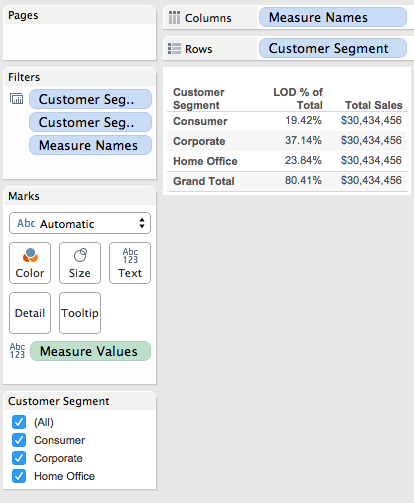
I’ve been trying to figure out how to write about this one, I think I finally have a simple enough scenario to describe: In my world of healthcare delivery, I have things like different payors where I want to know what % of the population is covered by a certain payor (like Medicare and Medicaid), and I don’t really need to show anything about the rest of the population other than have the raw numbers available in the computation. Using Superstore, we can do a equivalent modeling of that using Customer Segment as a stand-in for a set of possible distinct conditions for each patient (Customer). So I want to know what % of total Sales are in a given Segment, being able to filter for any set of Customer Segment(s) I want, and show the sum of the % of total Sales for only my filtered Customer Segments. Ideally ending up with something like this:

2015-06-17 07_52_51-Tableau - LOD and Grand Totals

Read on for how this goes from relatively difficult in earlier versions to relatively simple in Tableau version 9.

Continue reading →

Level of Detail (LOD) Expressions

Level of Detail (LOD) Expressions (also called LOD Calculations)

White paper by Alan Eldridge & Tara Walker: https://www.tableau.com/learn/whitepapers/understanding-lod-expressions

Top 15 LOD Expressions by Bethany Lyons: https://www.tableau.com/LOD-expressions

Tableau online help for LOD expressions: http://onlinehelp.tableau.com/current/pro/online/windows/en-us/help.html#calculations_calculatedfields_lod.html

Video intro for LOD expressions by Craig Bloodworth @ the Information Lab:
https://www.youtube.com/watch?v=BnSF6i4MW0E&feature=youtu.be

Bora Beran’s blog introducing LOD expressions:
https://boraberan.wordpress.com/2015/01/30/whats-new-in-tableau-9-0-part-2-level-of-detail-expressions/

Mark Jackson on Using LOD to return a lower level dimension value (2 posts, plus Jonathan’s remix)
http://ugamarkj.blogspot.com/2015/05/using-tableau-lod-to-find-dimension-at.html
http://ugamarkj.blogspot.com/2015/05/updated-using-tableau-lod-to-find.html
http://drawingwithnumbers.artisart.org/lod-expression-remix-finding-a-dimension-at-a-lower-level/

Alan Eldridge’s blog (this material is refined in the white paper mentioned above):
Understanding Level of Detail Expressions – Part 1
Understanding Level of Detail Expressions – Part 2
Understanding Level of Detail Expressions – Part 3

LOD Rework 1 – Relative Date Filter

Mark Jackson on using LOD expressions for a nested filtering situation:
http://ugamarkj.blogspot.com/2015/02/advanced-grouping-with-tableau-level-of.html

LOD expressions for semi-additive measures:
Guest Post: Tableau LOD calcs for semi-additive measures

Comparison of LOD expressions to techniques in other tools (Excel, SQL, Altered, etc.)
https://dabblingwithdata.wordpress.com/2015/03/05/why-version-9-will-fix-tableau-for-me-and-workarounds-in-the-mean-time/

Using FIXED vs INCLUDE/EXCLUDE:


[loop category=”wikicontent” tag=”lod, lod calculations, lod expressions”]
[field title] – Added [field date]
[content]
[/loop]

Related posts:

      [loop tag=”lod, lod calculations, lod expressions” exclude=”this” relation=”and” compare=”not” taxonomy=”category” value=”wikicontent”]
  • [field title-link][field thumbnail-link]

[/loop]