Learning something new every day: Annotating Subtotals

I’ve been reading Alberto Cairo‘s The Functional Art – which is a fabulous book, btw – and thinking about annotations as part of storytelling. Then Tableau Zen Master Joe Mako posted this yesterday:

Eddie Van Halen and Dashed Lines

Mastery can be magic. I can remember a time as a young person when I just started to have a clue about how music was made hearing an Eddie Van Halen solo on the radio and wondering, “How does one person make that many notes???” Or the scene in The Empire Strikes Back where Yoda lifts the X-Wing out of the bog and Luke is hornswoggled. Amazement, disbelief, and “I want to do that too!” all rolled into one feeling, when the heretofore impossible becomes, for an instant, possible.

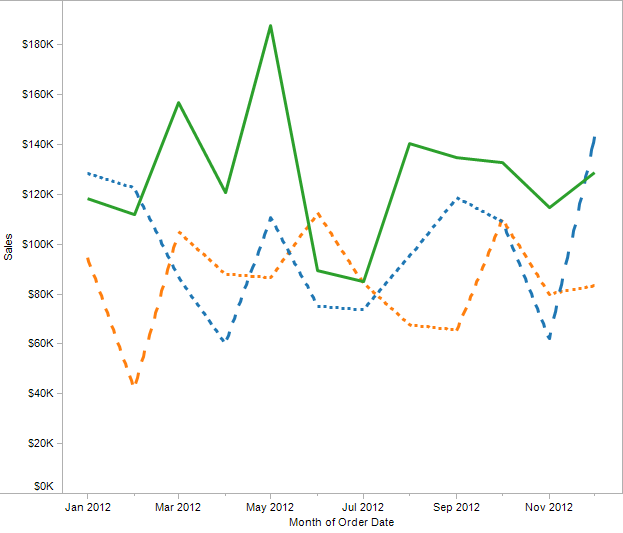
One of the things Tableau doesn’t do is let you draw line charts with dashed lines, to create a view like this that could be from Excel or another application:

Solid and Dashed

Except that Tableau can do this, and you’re about to learn how – actually, three entirely different techniques. Along the way you’ll learn some more about how Tableau draws Line Marks and table calculation domain padding.

Continue reading

Unexpected Results: Aliases in URL Parameters

Fellow Tableau Zen Master Andy Kriebel writes great tutorials, like this one on passing filters in a URL. I was using those instructions to build URLs to pass from one Tableau workbook to another and things were going swimmingly in trials until I got to my data, where I found not one, but two undocumented features of Tableau’s URL parameters.

Aliases in URL Parameters

When we set up a URL Action in Tableau and add fields to the action, if the field is a Tableau parameter or a discrete dimension that has an alias assigned, when generating the URL parameters Tableau will use the alias and not the original value. So, for example, if your field is an integer such as 201 with a string alias of MS4, Tableau will pass MS4 and not 201, like in the image above. If you have a mix of some aliases and some not, Tableau will use the aliases where they exist.

Tableau Parameters used in URL Parameters Affect Parameters in Target Worksheet

The documentation doesn’t explicitly state that Tableau can use a Tableau parameter in a URL Parameter, but we can. And one of the interesting effects is that if the target of the URL is another Tableau workbook and there is a Tableau parameter of the same name in that workbook, then Tableau will set the value of target’s parameter to the passed value. This is a useful feature for making parameters truly global. The one caveat is the issue above, if the parameter is using an alias then the alias is passed to the target, not the original value of the parameter.

There are a three ways I’ve come up with so far to deal with this:

  1. Stop using aliases and set up the parameter or field with the desired values.
  2. Set up the target to handle the aliases.
  3. Instead of using the parameter or discrete field with the alias as the parameter, use a calculated field that just has [myParameterOrField] as the formula so it will just have the value and not any alias.

I’m using #1. This is a bit of a letdown for me, in reading up on improving performance there are big gains to sticking with numbers and using aliases instead of strings, and having to add extra columns to the data in the case of #3 to avoid this seems to partially defeat the purpose. If you have others, let me know!

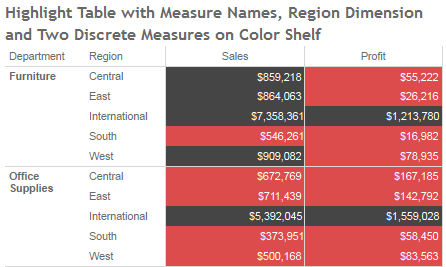
Measure Names on the Color Shelf: Tableau v8 Enhancements

Tableau version 8 “The Kraken” is in beta right now, and Tableau is also beta testing Tableau Public for the new release, and they’ve kindly given me access to it. Tableau v8 is a huge release, as I’m exploring it I’m finding some subtle and not-so-subtle differences. In the coming weeks I expect to do a series of posts on how those changes affect my workflow, and/or relate to prior posts of mine.

I’m going to focus on the new feature that enables multiple discrete (blue) pills on the Colors Shelf of the Marks Card, in particular how it interacts with the Measure Names pill and makes possible some things that were much more difficult to to in prior versions of Tableau.

Continue reading

A Tableau Wiki

I began keeping notes in a Word document when I started using Tableau – links to Tableau forum posts, blog posts, some screenshots, etc. Once it got past 30 pages, I started thinking about putting it online. Once it got over 50 pages, it became unmanageable except to fire up Word, press Ctrl+F to search, and look up what I’d entered. I’d shared the doc with a few people and they suggested putting it online, and so that got queued up. I’ve been down with a cold the last couple of days and not able to do anything requiring too much brainpower, so copying and doing some light reformatting was a perfect task…  Continue reading