Category Archives: Tips and Techniques

Tips, tricks, and how-tos on working with Tableau

putting grand total together

Customizing Grand Totals – Part 2

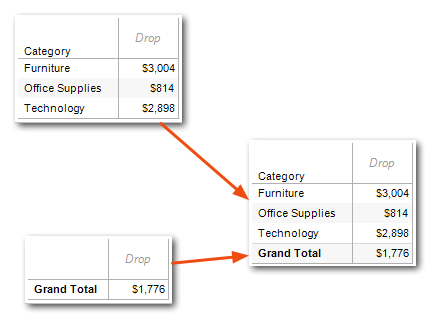
In Part 1 of this series, I introduced one workaround to the issue of getting Grand Totals to show a different value from the Tableau defaults, by using two worksheets – one for the detail rows and one for the Grand Total row – on a dashboard. That method has a few limitations, the biggest being that it can’t handle Subtotals. Here, you’ll learn two additional techniques for customizing Grand Totals and Subtotals in a single worksheet, and their limitations: using MIN() and MAX() to test for the Grand Total row, and using a table calculation with a duplicated dimension. Continue reading
Dynamic secondary axis titles (in a few more minutes)

In a comment, Joe Mako used his pixel ruler to identify some changes to make the final dashboard tighter and more accurate, I’ve edited the instructions to include this.

A couple of days ago, the Andy Kriebel (follow his blog if you aren’t already) posted Dynamic axis selections with parameters in less than five minutes. This technique enables users to pick the measure they want to view. The super-short version of the instructions are: Continue reading

Grand Total Dashboard

Customizing Grand Totals – Part 1

Of all the questions on the Tableau forums, one of the more common ones is that people see the Grand Total and/or Subtotal rows – the ones created by going to the Analysis Menu then choosing Totals->Row/Column Grand Totals – not providing the results that they’d expect. And then, of course they’d like to have the total rows provide the desired results. For example, the measure might be a Count Distinct or an average, and the desired total is the sum of all the returned values and not what Tableau generates. Continue reading