Category Archives: Tips and Techniques

Tips, tricks, and how-tos on working with Tableau

Creating a Dynamic “Parameter” with a Tableau Data Blend

As of June 2015, Tableau is actively looking at different aspects of the (complicated) subject of dynamic parameters. See Dynamic Parameters: The Results are In for an overview, and Dynamic Parameters Update for continuing updates.

Currently (July 2013), the #1 most-voted-for Idea for Tableau is Dynamic Parameters. Here, I’ll show you a technique for using Tableau data blending to create a dynamic, data-driven “parameter”. We’re going to use a loosely coupled secondary data source to get the information associated with the “parameter” and return that information to the primary data source, where it can be used in further calculations. Some examples of where this can be useful:

  • Choose one value to build a comparison to other values, such as finding the distance from a chosen origin city to a set of destination cities, or a market basket-type analysis where we want to compare one against others.
  • Set the limits and input data to an algorithm that is then used to create other results, for example to get a starting set of data to use to build a projection, such as an executive retirement forecast model.

Read on for a description of the technique and demos of all three options!

Continue reading

Top 10 Table Calculations – The Next N, Where N >= 15

Last year I did the big workbook on conditional formatting to answer some really common questions on the Tableau Community Forums. One of my projects lately has been to do the same for table calculations, which are incredibly powerful, sometimes incredibly complicated, and I believe underutilized. Tableau put together a set of Top 10 Table Calculations, here’s a list I’ve compiled of the next N most-commonly useful table calculations, based on volume of questions on the forums and relative ease of construction (there’s no densification, domain padding, domain completion, or any of that stuff in this batch):

  1. Filter Without Affecting Results
  2. Filter Top N Without Affecting Results
  3. Filter 1st Time Period from Difference from Prior
  4. Sorting by a Table Calc
  5. Comparing Selected to Group
  6. Aggregating at Different Levels…
  7. …And Returning Fewer Results
  8. Filtering Out Extra Marks by Using a Duplicate on the Filters Shelf
  9. Nesting Table Calculations to Aggregate in Different Directions
  10. Performance – One Computation to Return Same Result to All Rows
  11. How Many of X Did How Much of Y
  12. Title Showing Date Range
  13. Jittering a Scatterplot
  14. Extending an Axis with an Invisible Reference Line
  15. Making a String List

And of course, there’s a workbook with instructions! Click to view and download the next N table calculations workbook on Tableau Public or click the image below:

9. Nesting Table Calculations

I can’t claim to have originated any of these calculations, thanks to Ross Bunker, James Baker, Joe Mako, Andy Cotgreave, Richard Leeke, and others I’m sure I’m forgetting for their work!

If you have any other really common uses for table calculations, leave a comment!

Tableau Wiki

Introduction

This is a collection of most all of my Tableau notes, mostly a lot of links to Tableau forum and blog posts, some screenshots, and some written notes. Browse through the list of wikis below, and/or use the Search or tag cloud on the sidebar to the right.

When I started using Tableau, I began a Word document with my notes that also had a lot of links to Tableau forum posts, blog posts, etc. Once it got past 30 or so pages, the only way I used it was to search it, and I kept on thinking it would be better online while the total text grew to over 50 pages. I shared the doc with a few other users and they thought it was a great resource, so here it is.

This is my own personal supplement to the Tableau manualsKnowledge Base, and community forums, and The Information Lab’s Tableau Hub. You can access the wiki via the menu above, the Search to the right, the wiki tag cloud to the right, or from the list of sub-wikis below.

A few words of caution: Your mileage may vary, use at your own risk, caveat emptor, etc. The text here is not necessarily up to date, authoritative, or even accurate. It reflects my own learning process and understanding. Try it out, see what works for you, and let me know what doesn’t.

As of November 2013, the wiki has been irregularly updated, I’ve changed how I’m managing it (using straight WordPress pages now) and there will be more updates.

Why is COUNTD(Customer Name) red?

Last week I’d promised to explain why the solution for identifying whether All items in a Tableau Quick Filter were selected wouldn’t work under certain circumstances in Tableau version 8, here it is, and along the way I’ll explain why COUNTD(Customer Name) could be red and the “Cannot blend the secondary data source because one or more fields use an unsupported aggregation.” warning message.

Continue reading

Identifying (and Using) Quick Filter Selection Status

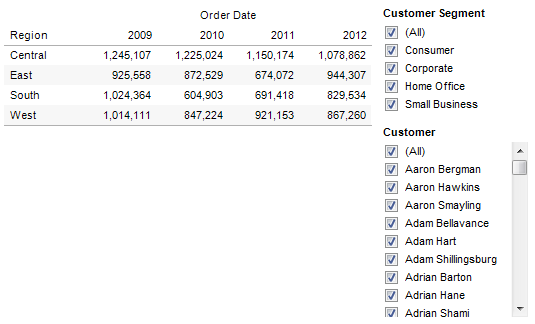
This post on the Tableau forums led me to figure out a new trick with Quick Filters. The goal is to know whether a Quick Filter has (All) Customers selected or some subset of Customers, then return a different measure based on that flag. Just to make it a little more fun, we want this calculation to work when there are other filters present, or not, to look something like the following view based on the Superstore Sales data:

Screen Shot 2013-05-30 at 11.36.17 PM

Continue reading